What's New in Clever Groups
Latest features, improvements and policy updates — most recent first.
14 October 2026
Keep-apart pairs were not always kept apart — fixed, and we’re sorry
A teacher let us know that Clever Groups had placed two students in the same group even though they were set as a keep-apart pair. She was right. The performance of keep-apart dropped as an outcome of our most recent update, on 13 September, and it affected all three generation modes.
It’s now fixed, and we’ve added automated tests so it can’t quietly return. While we were there, we also strengthened how Random Groups handles keep-apart pairs. If you use keep-apart pairs and have generated groups since 13 September, please check those groups or generate again. Teams without keep-apart pairs were not affected.*
* In rare, very heavily restricted classes it may not be possible to keep every pair apart.
20 September 2026
We fixed some things we should have caught earlier — and we’re sorry
Last week one teacher emailed to let us know they couldn’t submit a support ticket, and that generating groups from a partial student selection was returning the wrong students — not the ones selected.
We jumped on it straight away and had both fixed within a couple of hours. We’ve added automated tests to make sure neither can happen again. We should have had coverage for both before now. We didn’t, and that’s on us.
Group History was silently broken since 13 September — also fixed
The 13 September update introduced a bug that silently broke Group History for most teams. Saving your groups and then logging out — or simply returning the next day — left the Group History button greyed out, as though nothing had been saved. The generation itself ran correctly and the results displayed as expected, but the record wasn’t being stored.
Once we became aware of it, we jumped on it straight away. We’ve fixed it, and Group History now saves correctly and will be there every time you return to a team, regardless of whether you’ve logged out since. We’ve also added automated tests that check history survives a logout and re-login, so this can’t quietly break again.
We’re sorry. Around 70 generation sessions were affected between 13 September and today. Those records can’t be recovered — but from this update forward, everything saves as it should.
Foundation Free credit accounting error — also fixed
For Foundation Free users, we found an accounting error that wrongly reduced your bonus credits. These have now been restored.
Teams with display issues can now be opened
Some teams were showing garbled student names, or refusing to open at all — a character encoding issue in how names were stored. Affected teams will now load and display correctly.
We’ve also added protections to prevent names from being stored incorrectly going forward. If you import an Excel file containing characters Clever Groups can’t support yet, you’ll now see a clear message explaining which name caused the problem and what to do, rather than a silent failure. Learn more →
Full international character support — including Hebrew, Arabic, and other non-Latin scripts — is on the roadmap.
13 September 2026
Better and faster group generations
Clever Groups has been improved and produces better groupings. We tested it across more than 600 real group generation exercises from Clever Groups teachers — real class sizes, real preference patterns, real group configurations spanning years of actual use.
Across those exercises — 46,000 student placements in total — the update placed around 1,300 more students with at least one person they chose, compared to the previous version. The improvement was consistent across every class size tested — 20-student groups, 120-student cohorts, and 300-student year levels alike.
Clever Groups is also substantially faster, especially for large cohorts. The speed improvement compounds with cohort size: a 500-student generation runs around three times faster than before; at 1,000 students the improvement is nearly seven times. Grouping by hand — in a spreadsheet, on paper, or just by feel — was never a realistic option beyond around 30 students. For year-level exercises, transition programs, and whole-faculty groupings, the faster Clever Groups completes the calculation, the more time you have for everything else.
No action is needed on your end. Every generation from this update onwards uses the latest version automatically.
Three ways to generate groups — including two new modes
One of our most-requested features was also the most clearly expressed: “I need every student to end up with at least one person they know.” Camp cabin groups where a child doesn’t know anyone in their cabin. Overnight trips where being placed with strangers isn’t just uncomfortable — it’s a wellbeing concern. Transition programs where a new student needs one familiar face to feel safe.
The honest answer, until now, was that Clever Groups couldn’t guarantee that. Preference Groups finds the best arrangement for the group as a whole — but “best overall” and “no student left behind” are genuinely different problems. For most classroom work, the overall optimum is exactly what you want. For high-stakes social placements, it isn’t.
We heard you. This update adds two new modes built for exactly those situations.
Preference Groups — the mode you’ve always used — now has two new modes alongside it.
Demand Groups treats each preference as a demand, not a wish. No student left behind. It works to ensure every person ends up in a group with at least one person they chose — and if group sizes or keep-apart rules make that impossible for someone, Clever Groups tells you exactly who and shows you how close it got. Tested across more than 600 real exercises, Demand Groups consistently placed a higher share of students with at least one person they chose than Preference Groups on the same data — the trade-off is a lower overall group satisfaction score, which is expected because the two modes are solving different problems.
Two sub-options control which preferences count. First preference only — focuses exclusively on each person’s top choice; best when only one preference was collected, or when only the top pick matters. All preferences — looks across each person’s full list; more options to work with, and more likely to find an arrangement where everyone gets someone they chose.
On a free trial or Foundation Free plan, Demand Groups counts as 1 credit per generation — the same as any other generation. All paid plans — Foundation Annual, Educator Annual, and Educator Monthly — include unlimited generations across all three modes.
Random Groups places everyone at random, without reference to any preferences submitted. Each run produces a completely different arrangement. The satisfaction score and preference counts are still measured and shown afterwards — so you can see directly how a random draw compares to a preference-based generation on the same team data.
Preference Groups produces a different arrangement each time you run it. Clever Groups cycles through all possible best solutions as it maximises group satisfaction. Students who didn’t submit preferences are randomly allocated to a group each generation.
Any keep-apart pairs you’ve set are honored in all three modes.
Understanding your satisfaction scores
All three modes show a satisfaction score after every generation. The average group satisfaction score is the one you’ve always seen: a weighted measure of how well the arrangement honors preferences across the whole team. After every generation you’ll also see how many students had their first preference placed, and how many had any preference placed — with the most relevant one shown in bold. When running Random Groups, these scores reflect what happened to any preferences in the random draw, not what Clever Groups was working to achieve. Learn more about what the scores mean →
Choose what to show in the display and print view
The group display view now has two toggles: Show preference indicators and Show metrics. Preference indicators are the small glyphs that appear next to each student’s name showing whether their preferences were placed. Metrics are the satisfaction scores shown above each group.
Both are on by default. Turn either off when you want a cleaner view for a projector or a printed sheet — names only, no scores, no glyphs. The setting applies instantly and carries through to the print layout.
4 August 2026
60 bonus credits added to all Foundation Free accounts
We’ve added a significant number of new features over the past month and have a lot more planned based on the most common feedback from teachers over the years. To give Foundation Free members an opportunity to try everything, we’ve added 60 bonus credits to every Foundation Free account.
These sit on top of your regular monthly allocation and count down as you use them — no expiry date. Your 3 credits per month continues as normal once they’re used.
Foundation Annual is available at the founding-member rate with an additional billing launch discount until 28 November 2026. View your account →
Free trial doubled to 20 group generations
New accounts now start with 20 group generations to explore with — double the previous trial. That’s enough to try all three generation modes, experiment with different group sizes and constraints, and get a real feel for what Clever Groups can do before committing to a plan.
30 July 2026
Group sizes now open to the full team
This is one of the most-requested changes since Clever Groups launched. Previously, the maximum group size was capped at half the team population — so a class of 30 students could not have groups larger than 15. That limit has now been completely removed.
You can now generate groups of any size, right up to the entire team if you need to. This makes Clever Groups far more flexible for team structures that don’t fit neatly into the old constraint — whether that’s a single large working group, a handful of very large groups, or anything in between.
Progress bar for large group generation
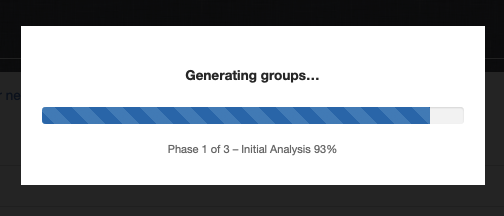
For teams of 200 or more students, generating optimal groups can take a minute or two — Clever Groups is doing a lot of work behind the scenes. Previously there was no feedback during that time, which could feel like the page had frozen.
We’ve added a progress bar that shows you exactly where Clever Groups is up to, across three phases: initial analysis, secondary analysis, and final optimization. You can watch it work in real time. Teams of up to 1,000 students are supported.
Groups now always reflect the correct students
Some teachers reported seeing duplicate students or unexpected names in generated groups — particularly with larger teams. This was caused by a timing issue: if a student joined the team in the moment between clicking Generate and Clever Groups completing the group generation, the page could pick up that change mid-run and produce inconsistent results.
This has been fixed. Clever Groups now locks the student team at the moment you click Generate and Clever Groups generates groups against that snapshot. Any student who joins while generation is in progress will appear in your team list afterwards, ready for your next generation — but they won’t interfere with the current run.
The Team Status setting (Open / Closed for Guests / Closed) remains the right tool when you want to actively control who can join your team — for example, locking the team before a session starts so no late additions appear at all. The fix above means generation is now reliable regardless of status, but closing your team is still good practice when you want a definitive, stable team.
28 July 2026
Educator Monthly plan
A monthly subscription option is now available. Educator Monthly gives you unlimited group generations, billed month to month with no lock-in. If you decide Clever Groups is saving you time in the classroom, you can switch to an annual plan at any time from your account page and pay less overall. Visit the pricing page to compare plans and subscribe.
10 July 2026
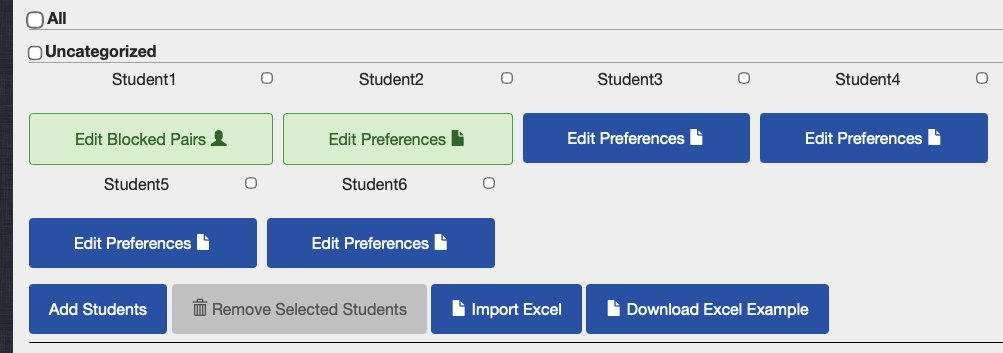
See at a glance who has submitted preferences
The Edit Preferences button for each student now turns green as soon as they submit at least one preference. Blue means no preferences yet. You can see the whole class at a glance without opening any individual student’s record — useful for chasing up students before the preference deadline.
See how well the grouping worked for each student
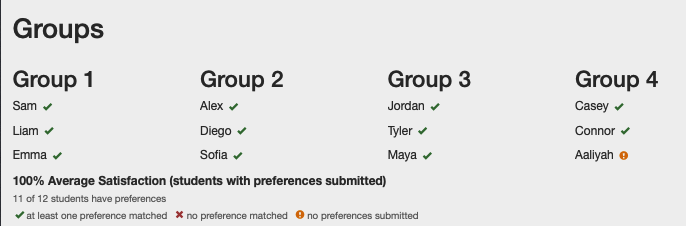
Group results now show a small symbol next to each student name so you can see at a glance whether their preferences were matched:
- Green tick — at least one preference was matched.
- Red cross — no preferences were matched.
- ! Exclamation mark — no preferences submitted by the team member.
The satisfaction percentage shown above the groups now counts only students who submitted preferences — so students who missed the deadline do not drag the score down unfairly. The glyphs update in real time as you drag students between groups.
Display / Print Groups & Export
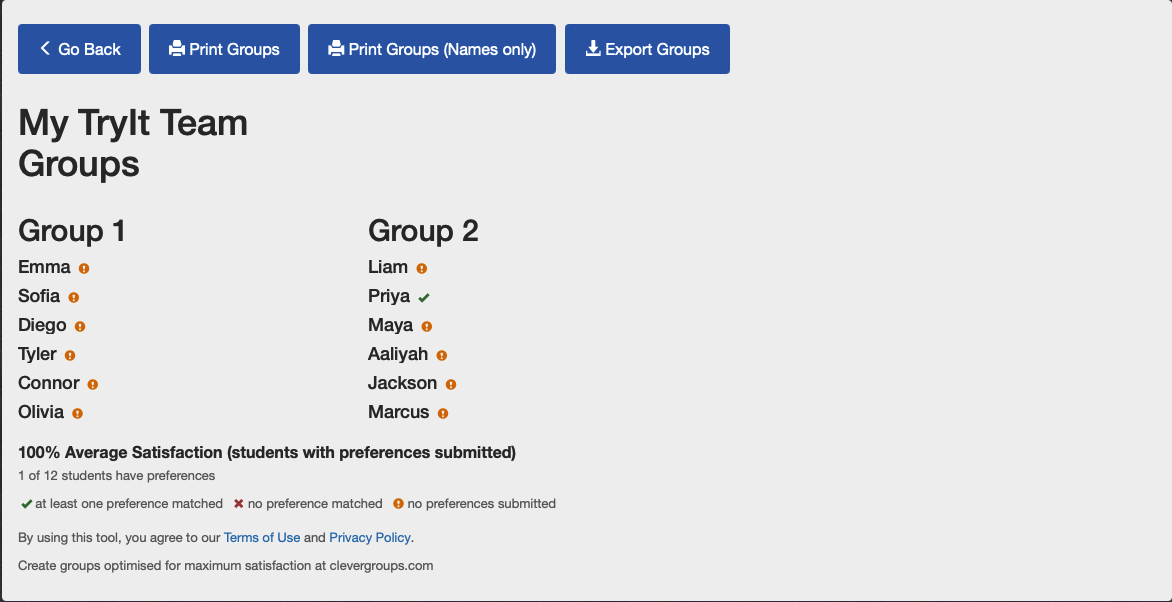
The Display / Print Groups button opens a clean, full-screen view of your groups designed for projecting in class. There are no editing controls — just the names and satisfaction results, clearly laid out so every student can read them from the back of the room.
Inside, two print options let you choose what to share:
- Print Groups — includes the satisfaction percentage, preference glyphs, and the Clever Groups watermark.
- Print Groups (Names only) — names and watermark only. Use this when posting results publicly and you don’t want students to see each other’s preference data.
You can also Export Groups to CSV from within this view.
Random group generator
Not every activity needs preferences. The random group generator gives every student an equal, unbiased chance of ending up in any group — ideal for icebreakers, sport rotations, seating changes and low-stakes activities where you want variety without the preference-collection step. Supports up to 200 students. Completely free — no sign-up required.
Try 13 example generators before you sign up
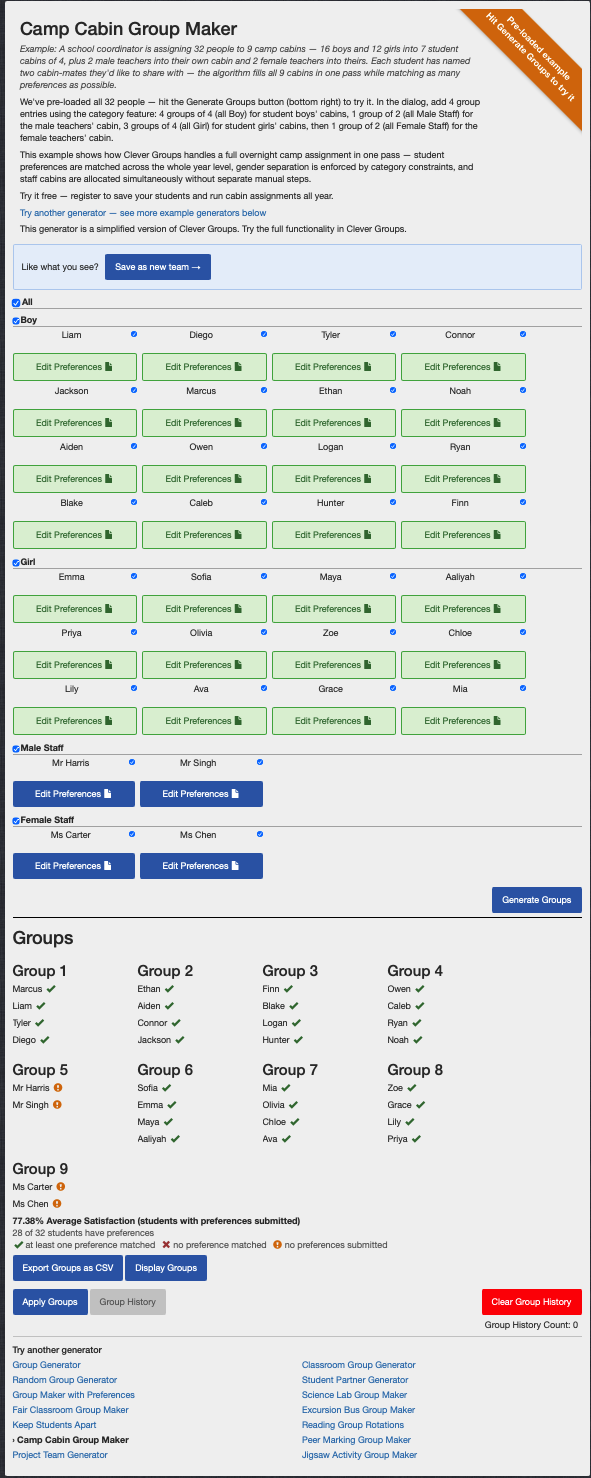
New example generator pages are available at clevergroups.com/try. Each page arrives pre-loaded with sample students so you can generate groups immediately and see real results — no sign-up required.
Preference-based scenarios:
- Fair groups — balanced groups by ability level
- Camp cabins — mixed-gender cabin allocations with staff
- Bus groups — seating with supervised student support
- Classroom groups — mixed ability with learning support
- Jigsaw groups — expert and home group roles
- Project teams — multi-role team composition
- Lab groups — paired lab partners
- Reading rotations — guided reading level groups
- Student pairs — preference-based buddy pairs
- Keep apart — separating students who shouldn’t be grouped
- Preference groups — pure preference-based grouping with no categories
- Peer marking — assigning students to mark each other’s work
29 June 2026
Subscription plans
Clever Groups has moved to a subscription model. If you registered before this date, thank you for being an early user — your account has the option of moving to a Foundation Free plan, which includes 3 free group generations per month.
Foundation Free gives you enough generations to try Clever Groups with your own class lists. If Clever Groups is saving you time in the classroom, a Foundation Annual subscription is available to current registered users at a special founding-member rate. This is the lowest rate the plan will ever be offered at, and it locks in that price for as long as you keep your subscription active.
All your data is retained regardless of which option you choose. New teachers registering now start on a free trial. Visit your account page to see your current plan and available options, or view the pricing page for a full plan comparison.
On any plan — including free — you always have full access to view and edit your teams and student data, and to import and export at any time. Generation limits only affect how many times you can run Clever Groups each month, not your access to the data you’ve already built up.
Change your email address from your account page
You can now update the email address on your Clever Groups account directly from your account page — no need to contact support.
Enter your new address and Clever Groups will send a verification link to it. Click the link within 24 hours to confirm the change. Until confirmed, your original address stays active so your account is never left without access.
This is particularly useful if you’re moving to a new school and your work email will stop working — update your address before you lose access so your account and billing history carry straight over.
Updated Terms of Use and Privacy Policy
Our Terms of Use and Privacy Policy have been updated to cover subscription billing and payment processing. Key changes include:
- Subscription plan terms, renewal, cancellation and refund conditions.
- Payment processing via LemonSqueezy as our Merchant of Record.
- Updated service provider table reflecting billing, transactional email and analytics providers now in use.
By continuing to use Clever Groups, you agree to the updated terms. If you have questions, contact us via our contact page.